The Industries Leading Technologies
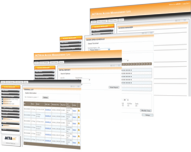
At the heart of the ACTAtek system is integrated web server technology. This technology gives administrators the freedom of managing either a single ACTAtek unit or an entire network of units from a single web browser window. As a result, the ACTAtek system does not require any complicated software applications or expensive servers.
To access the system, an administrator simply enters the unit's network address into a web browser's "Location" or "Address" bar. The administrator then logs in and is presented with the easy to use management interface.
Screenshot: Daily Report from the Super Administrator's interface using Microsoft's Internet Explorer.
If more than one ACTAtek is deployed at a facility the ACTAtek can be setup in a Primary / Secondary Mode. In this mode the one designated as the Primary unit, coordinates the exchange of enrollment data, access policies and audit logs from all the other units in the network. This allows an administrator to manage the entire network of systems from a single web browser window. All the information entered into the primary system is automatically propagated to all secondary units. For instance, in a single web browser interface, an administrator could create a policy that allows a specific group of people to access one area Monday through Thursday, 9:30AM to 6:00PM. With a few more mouse clicks, the administrator could create another policy for the same group, in a different area, allowing access only on Fridays from 1:00PM to 4:00PM. (Please view the User Management and Access Policies section for more information)
The enrollment of the user's biometric / fingerprint data, or a smart card is also handled by the Primary unit. When a user is enrolled in any unit, the information is sent to the primary unit, and then propagated to the other units on the network. Once enrolled, the user will automatically have access to all areas that their specific access policy allows. Likewise, once a user has entered an area, it is recorded and passed along to the primary unit. This allows for virtually all management functions to be accessed from a single source; a web browser connecting to the Primary unit.
For failover security, two "Backup Primary" units can be designated to create redundancy in the system. If the Primary unit fails, its duties are automatically assumed by a Backup Primary unit, until the Primary unit is either brought back online or is replaced.
Since the ACTAtek system is network based, it is imperative that data passed from the administrator's web browser to the ACTAtek unit is secure. Otherwise, any user on the network could easily "sniff", or acquire, an administrator's login data from the network; compromising the entire security infrastructure.
The ACTAtek utilizes the same technology used in online banking and e-commerce transactions, to ensure that the data being passed from the web browser to the ACTAtek unit is safe and secured. This technology is called "SSL Encryption" and is compatible with all common web browsers. Surprisingly, many web based access control products on the market today do not offer this, or any similar security features!
"biometric authentication refers to technologies that measure and analyze human physical and behavioral characteristics for authentication purposes." - Wikipedia, Feb 24, 2006
Most access control products take a one size fits all approach to security; typically allowing only card access or pin access. The ACTAtek takes a different approach by allowing a diverse range of technologies to be used for authentication, while preserving the central manageability of users, audit information and access policies. Biometric authentication can be used for sensitive areas while the less expensive pin pad only models can be used for areas, with minimal security concerns where user tracking is all that is necessary.
The following authentication methods are available with the ACTAtek system:
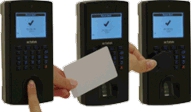
Fingerprint / Biometric - Fingerprint recognition has evolved into a technology that is extremely easy to use, inherently secure and remarkably affordable for many applications. Today biometric authentication is being used for applications ranging from government tracking of foreign nationals, to customers paying for groceries at the local store. The power of this technology is built on the fact that no two human beings have ever been found to have identical fingerprints. The ACTAtek harnesses this technology to provide unparalleled security for sensitive areas, at a price comparable to other, less sophisticated access control systems.
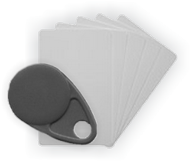
Smart Card / Proximity Card - For year's smart cards and proximity cards have been a staple of many access control systems. The ACTAtek system allows for this proven technology to be deployed where appropriate, in a secured environment. Most common smart card and proximity card formats are supported by the ACTAtek system including Philips Mifare, HID Prox, HID Prox II, HID iCLASS, Legic and EM.
Smart card / proximity card technology can be used in combination with fingerprint recognition to significantly increase security for the most sensitive areas. This is achieved by requiring the user to present two credentials, a valid smart card and also a valid biometric in the form of a fingerprint.
Pin / Password - In its most basic configuration the ACTAtek system can be deployed as a simple pin or password based system. While this configuration lacks the ease of use and security of biometric and card based systems, it does retain the same web enabled, robust user management, access policies and audit capabilities found in the other models.
It is important to remember that each of the above technologies can be used in tandem throughout a single or multiple facilities. The management of all units, whether it is a single unit or multiple units using each of the three authentication types, can be accessed, configured and managed from a single web browser. Please see the "Primary / Secondary Mode" in the "Web Based Network Management" section for more information.
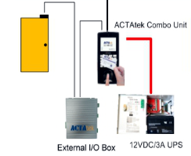
The ACTAtek system can be used with most common electronic locking mechanisms including electric strikes, electromagnetic locks and electronic deadbolts.
Electric Strikes – An electric strike is a device that is installed in the frame of the door opposite to the door latch. Electric current is used to control whether the door is locked or unlocked. These types of locking mechanisms are generally cheaper and easier to install than electromagnetic and plunger locks.
Electric strikes are available in two configurations; “fail-secure” and “fail-safe”. Below are brief explanations of both types:
Fail-Secure – A fail secure lock is a lock that will remain locked when no power is supplied to the device. During a power or system failure the locks and door are secure.
Fail-Safe – Unlike the fail-secure lock, a fail-safe lock will only stay locked when power is being applied. With this lock, a loss of power to the building or unit will result in the door being unlocked and safe for people to leave.
Electromagnetic Locks – These types of locks are generally referred to as “mag-locks” and they use magnetic forces to lock a door. Electromagnetic locks are generally mounted at the top of a door and consist of an electromagnet being attached to the door frame and an armature plate that is attached to the actual door. Like a fail-safe electronic strike, the “mag-lock” remains locked only when it is being supplied with power. A loss of power means the lock will demagnetize allowing the door to be opened. These locks are useful on glass doors.
Plunger Locks – A plunger lock is similar to a deadbolt except that it is mounted in the door frame instead of the door itself. This type of lock mechanism is useful on full swing doors.
Plunger locks are available in two configurations; “fail-secure” and “fail-safe”. Below are brief explanations of both types:
Fail-Secure – A fail secure lock is a lock that will remain locked when no power is supplied to the device. During a power or system failure the locks and door are secure.
Fail-Safe – Unlike the fail-secure lock, a fail-safe lock will only stay locked when power is being applied. With this lock, a loss of power to the building or unit will result in the door being unlocked and safe for people to leave.
One of the optional accessories that works with the ACTAtek system is an integrate CMOS camera. This discrete camera is embedded behind a small hole above the ACTAtek’s LCD screen. The camera will capture the user’s image during each enrollment attempt. Immediately after the capture, the image becomes viewable from the Event Log in the ACTAtek’s web browser interface. Up to 500 of these images are stored.

The Integrated CMOS camera is an effective tool for combating “buddy-punching” and other fraudulent behavior.
The ACTAtek system allows for the combination of access control and video surveillance with the use of network-capable IP cameras. This arrangement centralizes security management and monitoring, by allowing the IP cameras to be accessed from within the ACTAtek’s web interface. Using a special interface cable, the camera can be configured to record the authentication, entry and departure of each user. Alarm conditions such as door open alarms and ACTAtek intrusion detection can also trigger the camera to record.
Since the ACTAtek allows doors to be remotely opened, the external IP camera can be used to identify the person requesting entry into the facility, the number of people awaiting entry and the circumstances of their entry.
The ACTAtek makes managing users and departments easy, due to its streamlined web interface. Adding, editing, viewing and searching user’s data can be performed from any PC on the network, without any pre-loaded proprietary software. The ACTAtek has a very easy learning curve for User Administrators.
The screenshots below show the main user management section that a User Administrator can use to perform management functions:
Screenshot: User List from the Super Administrator's interface using Microsoft's Internet Explorer.
Each user in the ACTAtek can be associated with one or more access groups. An access group defines the times and days that a group of users may access specific areas.
The screenshots below detail the process of creating and managing access groups and policies:
Screenshot: Access Rights page from the Super Administrator's interface using Microsoft's Internet Explorer.
The Attendance Report allows Administrators to view and export the Time and Attendance data of a single user or multiple users. The ACTAtek system will track the In and Out punches for each employee and calculate their total, daily working hours. For more robust Time & Attendance capabilities please visit the Time & Attendance page.
Screenshot: Attendance Report from the Super Administrator's interface using Microsoft's Internet Explorer.
The Daily Report details user’s first and last “punches” of the day and whether the last punch was an IN, OUT or other “Trigger”.
Screenshot: Daily Report from the Super Administrator's interface using Microsoft's Internet Explorer.
The Event Log is the “raw” log of all authentication activity. This log displays information about each authentication attempt. If the Integrated CMOS Camera is installed, the event log will also display a link where the snapshot of the authentication attempt can be easily viewed. Every ACTAtek model is capable of storing 10,000 log entries.
Screenshot: Event Logfrom the Super Administrator's interface using Microsoft's Internet Explorer.
Several options are available for custom reporting capabilities. The list below details most of these options:
TimeRack – The Time Rack application is an enterprise grade, web based time and attendance application. Please visit the Time & Attendance page for more information.
ACTAtek Server – This PC based application allows for more robust user management and monitoring. This free application also contains several basic reports.
ACTAtek Agent – The ACTAtek Agent program is capable of updating database tables with the ACTAtek’s event log. This lightweight server application is compatible with the following databases: ODBC, mySQL, PostgeSQL and Oracle.
Development API – The ACTAtek can be directly accessed using SOAP based web services. Using this feature, almost all of the ACTAtek data can be accessed, modified and manipulated from custom applications. SOAP based applications can be developed quickly and easily from virtually any modern programming language. More information on developing applications for the ACTAtek can be downloaded from support.actatekusa.com
This device allows a User Administrator to enroll a user's fingerprint from a Microsoft Windows PC rather that on the ACTAtek unit. This time saving option connects to the ACTAtek unit via the free ACTAtek Server software application.
Altronix is a leading producer of UL listed power supplies for CCTV, medical and access control applications. These power supplies provide clean, regulated power during normal use and also during black-outs and brown-outs. We highly recommend the use of these power supplies to provide the highest level of safety and security!
All of the Altronix power supplies that we carry are UL Listed specifically for Access Control Systems (UL294), CUL Listed - CSA Standard C22.2 No.205-M1983, Signal Equipment File #S4707 and NFPA 72 Compliant.

The following features and specifications are standard with the models that we carry:
Our sales associates can assist you in determining which model is best suited for your individual needs.
Coming Soon...
Coming Soon...
The ACTAtek Server is essentially a Microsoft Windows based software application that extends the manageability and functionality of the ACTAtek integrated web server interface. The ACTAtek Server application is free and can be downloaded from support.actatekusa.com.
The key features of the ACTAtek Server application are:
User Management – The process of creating and managing users can in some cases be streamlined using this application. In addition to manually adding users, the ACTAtek Server application allows spreadsheet tables containing user information to be easily imported.
Remote Registration – With the optional Logiprint Remote Registration Device, users’ fingerprints can be enrolled on a User Administrator’s desk rather than directly on an ACTAtek unit. The Logiprint device uses a computers existing USB port and does not require expensive hardware or software.
Device Monitoring – The ACTAtek Server can be used to monitor an ACTAtek in real-time. Each time a user attempts an authentication, details of the event are displayed on the computers screen. Photographs of each user can be uploaded to the software and displayed with the details of the event. In fact, if the Optional Integrated CMOS camera is present, a snapshot will accompany the user’s and event’s details. This feature can be used to visually compare the user attempting entry with the stored photograph of the user.
Maintenance Functions – As with all similar devices, it is a recommended practice to backup both user and system data on a regular basis. The ACTAtek Server allows for easy backup of this critical data.
The ACTAtek Agent is a Microsoft Windows based application that connects to one or more ACTAtek units and constantly updates a database, residing on the host computer, with all event log data. The data can then be manipulated with programs such as Microsoft Access or custom, database driven applications. The ACTAtek Agent application is free and can be downloaded from support.actatekusa.com
Any door controlled by an ACTAtek can be remotely opened using the ACTAtek Door Open application. If the ACTAtek is equipped with the External IP Camera, the program will also show the video stream from the camera so an operator may identify the person at the door. Multiple doors can be monitored and accessed with the ACTAtek Door Open program.